5 Ways to Upgrade Your Current Logistics Software
A recent freight industry survey found that 49% of respondents preferred modular tools that work with existing platforms. It also found that 47% identified legacy-system integration as their biggest challenge.
For freight forwarders and 3PLs, replacing an entire system means months of migration, training, and disruption. Improving what you already have can be a simpler option.
Here are five practical ways to do it.
Key Takeaways
- Keep existing platforms that still work.
- Build custom features around your actual business processes.
- Connect disconnected applications through system integration.
- Automate repetitive operational tasks.
- Modernise in stages instead of replacing everything at once.
Why Replace A System That Still Does Its Job?
The core systems aren't necessarily the problem. The gaps between them are.
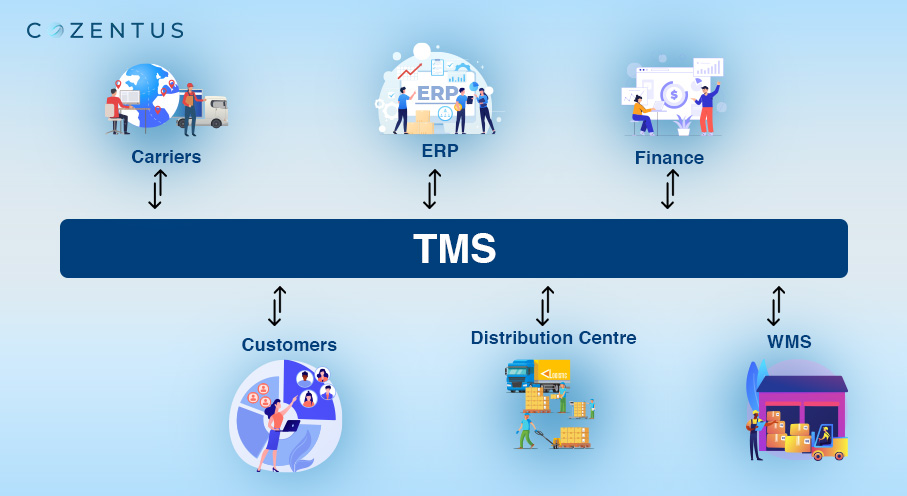
Your TMS manages bookings and shipments. Your ERP handles finance. Your WMS supports warehouse operations. These systems may be doing their jobs without major issues.
But employees still use spreadsheets for reports. Booking approvals happen over email. Carrier updates arrive through different channels. Finance teams manually compare invoices against shipment records.
Gartner's 2026 survey found that 56% of chief supply chain officers consider integrating AI with legacy systems and processes a major challenge. Gartner surveyed 140 senior supply chain leaders at organisations with annual revenue of $250 million or more.
Replacing everything means paying for a new platform, migrating data, rebuilding integrations, and training employees. It will take a lot of time and also disrupt processes that already work.
| Replacing the system | Improving the existing system |
|---|---|
| Wider platform migration | Targeted improvements |
| Major process changes | Changes to specific workflows |
| Higher disruption risk | Gradual implementation |
| Large upfront project | Investment based on business needs |
Start by identifying what your existing software cannot do. If the core platform is reliable, targeted logistics software modernisation may be enough.
5 Ways to Improve Existing Logistics Software
Each business has different operational needs, and the existing software may not cover them all. Here are five practical ways to fill those gaps, connect systems, and reduce manual work without replacing your core platforms.
1. Build around your actual business processes
Standard logistics software supports common workflows. But not all freight forwarders operate in the same way.
When the software cannot support different requirements, employees create workarounds using spreadsheets, emails, and manual data entry.
The fix: Add custom functionality around your existing platform.
Custom logistics software can support specific requirements without changing the core TMS or ERP.
For example, you could add:
- Customer-specific booking and approval workflows.
- Custom rate calculation tools.
- Customer portals for shipment updates and documents.
- Reporting applications that combine operational and financial data.
Example: A freight forwarder's TMS handles bookings well but cannot support a large customer's additional approval process. A separate approval workflow can connect to the TMS and handle the extra steps. The customer gets the process they need, while the operations team keeps using its existing platform.
2. Connect systems that don't communicate
A booking is created in the TMS. Someone copies the details into another application. The carrier sends an update through a separate channel. Finance waits for shipment cost information.
The information exists, but it doesn't reach the right people automatically.
This is where logistics system integration helps. APIs, or Application Programming Interfaces, allow different applications to exchange information.
Looking for Custom AI Solutions?
Common integration opportunities include:
| Systems | What integration helps with |
|---|---|
| TMS + ERP | Sharing shipment and financial data |
| TMS + Carrier systems | Booking confirmations and tracking updates |
| WMS + TMS | Warehouse and shipment information |
| Customer portal + TMS | Shipment milestones and documents |
Example: When a booking is confirmed in the TMS, the details can automatically reach connected carrier and business applications. Employees no longer need to enter the same information repeatedly.
3. Automate repetitive operational work
Experienced employees often spend too much time on routine tasks.
Think about freight invoice processing. Someone extracts invoice details, checks charges against a rate card, and enters approved information into the finance system. Other employees compare Bills of Lading (BoLs) against booking instructions or follow up with carriers for updates.
Logistics automation can reduce this manual effort without replacing the existing systems.
Useful applications include:
- Invoice reconciliation: Compare invoiced charges against agreed rates and shipment records.
- Document processing: Extract information from invoices, Bills of Lading and packing lists.
- Booking validation: Check details and flag missing information.
- Exception alerts: Notify teams when shipments are delayed or milestones are missed.
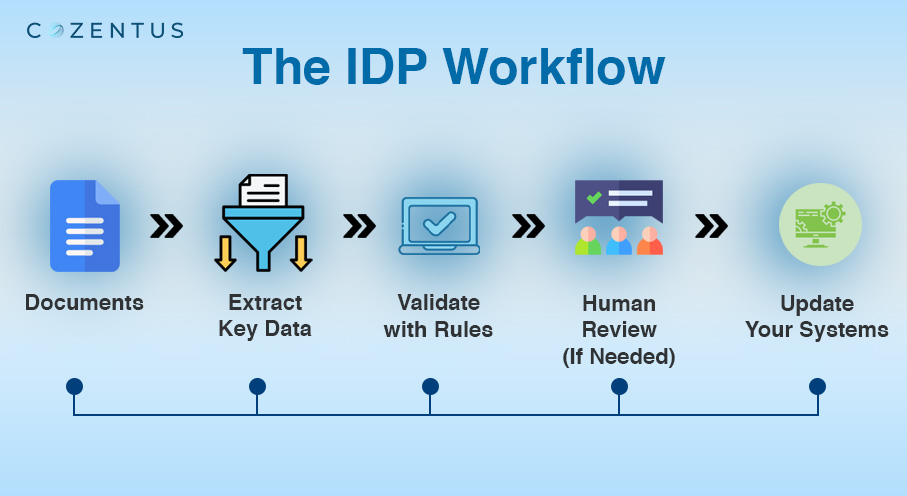
Intelligent Document Processing (IDP) is one of the best ways to automate manual document work. It uses OCR and AI to read documents, extract information and validate it against business rules. The resulting data can then be sent to existing TMS, ERP, or finance systems. Uncertain information can be flagged for human review.
Example: Instead of checking every vendor invoice manually, an automated workflow extracts the charges, compares them against agreed rates and flags mismatches. The finance team can focus on exceptions rather than repetitive checks.
Our Experience:
In one project, Cozentus helped a leading European logistics company automate its multilingual invoice processing using AI-powered IDP. The solution automated invoice extraction and validation, cutting processing time by 65%, costs by 30% and improving data accuracy by 90%.
Related Case Study: Invoice Processing Automation for a European Logistics Leader
4. Add new capabilities without changing your core platform
Customer expectations change. They may want better shipment visibility. Operations teams may need a central place to monitor carrier updates. Finance may want more detailed freight cost reports.
These requirements don't automatically justify replacing your TMS or ERP.
You can add applications that work alongside the existing platform.
| Business requirement | Capability to add |
|---|---|
| Better customer tracking | Shipment visibility portal |
| Changing carrier rates | Rate management application |
| Combined operational reports | Business intelligence dashboard |
| Better freight cost control | Freight audit automation |
The important part is connecting these additions to your core systems. Otherwise, you end up with another isolated application and another place for employees to check.
Example: A freight forwarder adds a shipment visibility application that collects tracking updates from connected carrier systems. Customers get a single view of shipment milestones, while the existing TMS continues to manage shipments.
5. Modernise in stages as your business grows
New customers bring different processes. Shipment volumes increase. Businesses add carriers, enter new markets, and introduce additional services.
If every new requirement demands a major software project, technology becomes expensive and difficult to maintain.
A more practical approach to legacy system modernisation is to improve one process at a time.
Start with these steps:
- Map your systems: List the applications, integrations and manual processes used across your operation.
- Identify the gaps: Look for duplicate data entry, delayed approvals and poor visibility.
- Prioritise the problems: Focus on areas affecting operating costs, turnaround times, accuracy or customer service.
- Improve one workflow: Build, integrate or automate a specific process.
- Expand what works: Use the results to decide what to improve next.
For example, you could start with invoice automation, then connect carrier updates and later introduce a customer visibility portal.
This makes technology investment easier to manage. You focus on capabilities that solve real operational problems instead of paying for a large replacement project.
Of course, some legacy systems will eventually need replacing. Security, performance, and scalability limitations should be taken seriously. The decision should be based on a genuine business or technical need.